
Epic Chat

Your New Bill Explained


Your new invoice is divided into different sections reflecting different types of charges, as shown below.

i Click on the below sections to get more detailed information

First Page

This is a summary of all your charges and discounts.
1. Account & Invoice Number

Keep these handy when you need help from our Care Team or when making a payment—they help us find your info quickly and sort out your bill faster.

2. Your Invoice Date

This is the date your monthly bill is issued.

3. Usage Billed For

Your bill always shows the usage from the previous month. That means it includes all charges, discounts, refunds, and payments made between the 1st and last day of that month. So, when you get your invoice, the “Usage Billed For” section will reflect the month before the invoice date.

4. Total Amount Due in previous invoice(s)

This is the full amount you currently owe, including any unpaid balances from previous month(s).

5. AutoPay Discount

This discount applies if you’re signed up for Direct Debit.

6. Total Due

This is the total you need to pay. It includes your current bill plus any unpaid amounts from previous bills (as shown in point 4).

7. Due Date

Make sure to pay by this date to avoid any late fees or service interruptions.

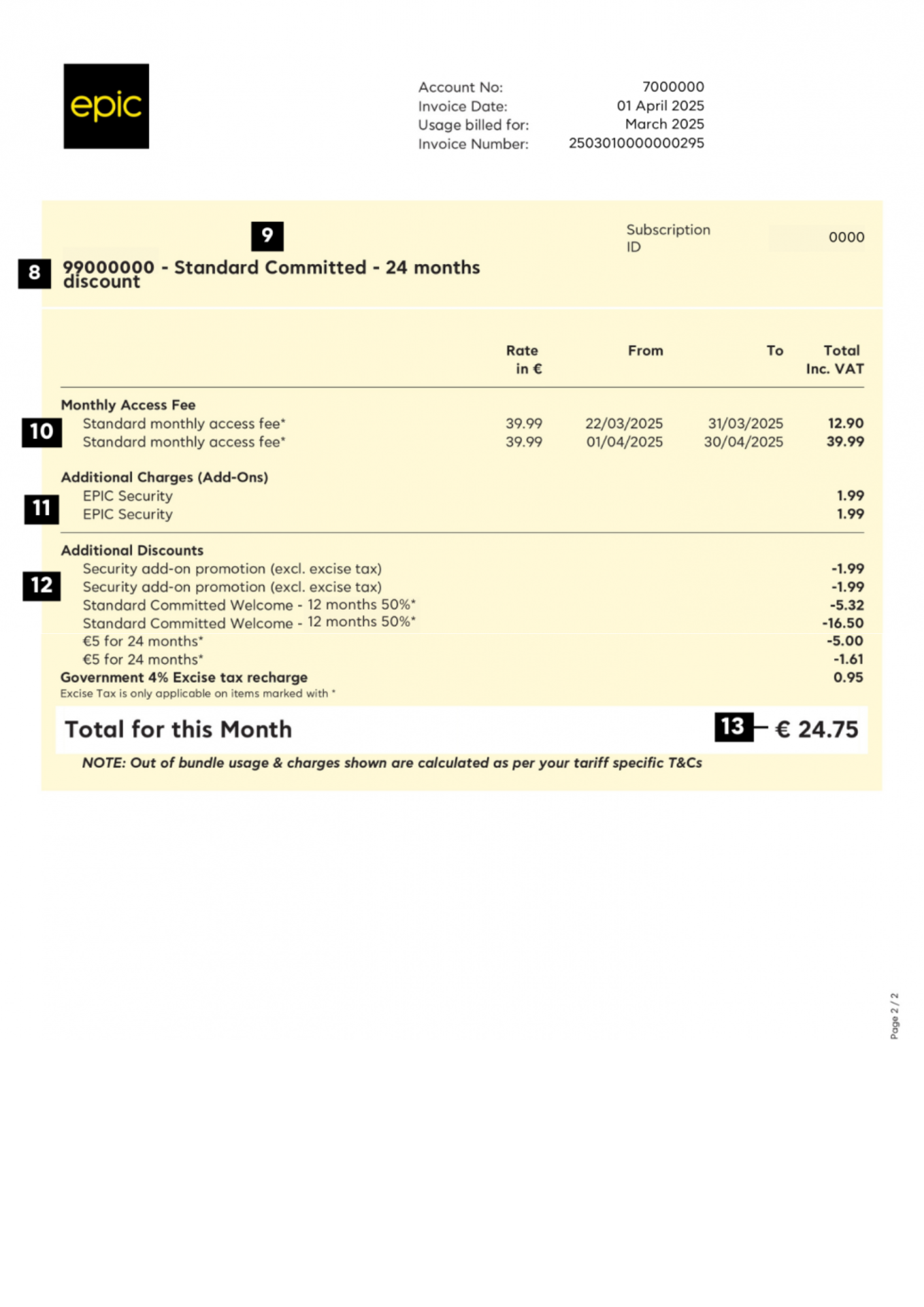
Second Page

 This section gives a detailed breakdown of all charges and discounts, line by line.

Q

Is this your first Epic bill?

If this is your first Epic bill, you’ll notice that some charges and discounts appear twice:

The pro-rated amount for the month you joined (excluding add-ons or extra services, which may be charged in full)

The full charge or discount for the current month

8. Your Epic Number

This is the Epic number linked to your Epic plan—the one your tariff and charges apply to.

9. Your Pay Monthly Plan

This shows the name of your Epic monthly plan. It also tells you whether you’re on a 24-month commitment or a flexible month-to-month plan.

10. Monthly Access Fee

This is the fixed monthly cost of your Pay Monthly Plan. It includes VAT but doesn’t include Excise Tax—that will appear separately on your bill.

11. Additional Charges (Add-Ons)

This section covers any extra costs, like add-ons (e.g., Security) or admin fees—such as the Printed Invoice Fee.

12. Additional Discounts / Refunds

Any discounts or refunds you’re entitled to will show up here as a negative amount. These will be automatically deducted from your total bill.

13. Total for This Month

This is the total amount due for this specific Epic line. It may be higher than the Total Due shown on the first page, because the AutoPay Discount is applied at the account level—not individually per line.